

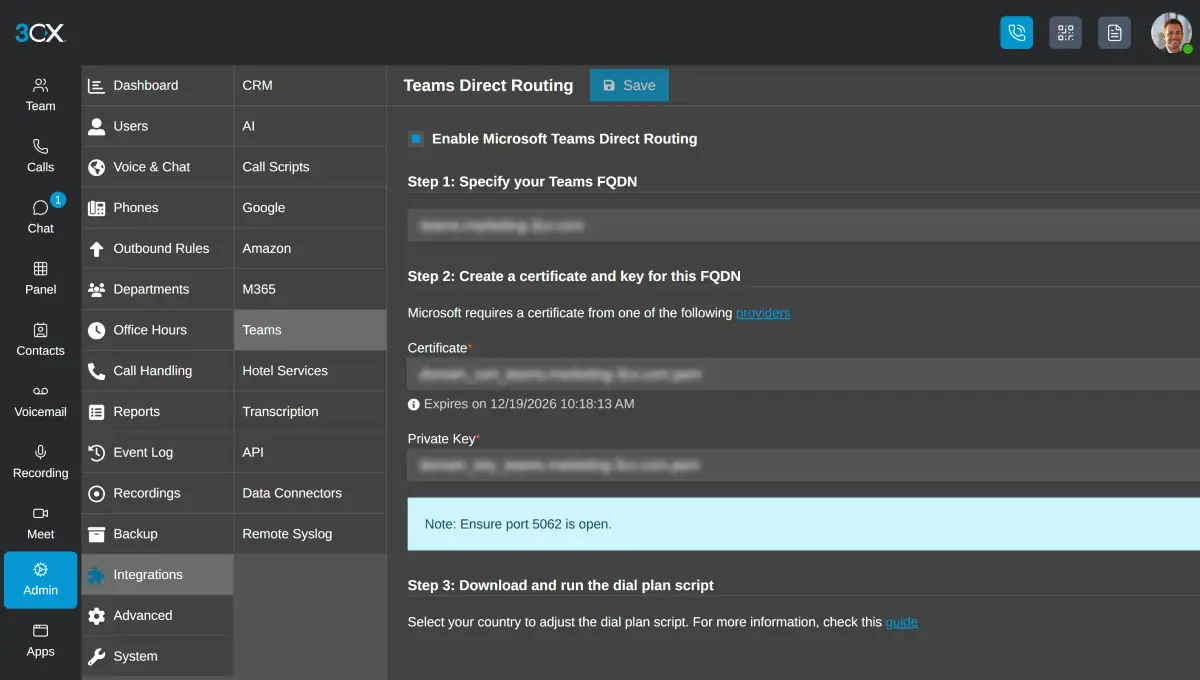

In short
The 3CX Teams integration connects Microsoft Teams to 3CX through Microsoft's Direct Routing, so Teams users can call 3CX extensions and outside numbers through the 3CX SIP trunk. 3CX documents it on the AI edition at 16 simultaneous calls and above. Forever Systems, a 3CX Partner, can quote and set it up.
Get a quote for 3CX Teams integration
Tell us roughly how many users or sites you have and we will come back to you with options and a quote.
What the 3CX Teams integration does
Some people in an organisation work in Microsoft Teams all day; others need the call handling of a phone system. The 3CX Teams integration joins the two with Direct Routing, Microsoft's method for connecting Teams to a phone system. Here 3CX is that phone system.
- Teams users can call, and be called by, 3CX users in the apps and on desk phones.
- Calls to and from outside numbers run through 3CX and its SIP trunk, so numbers, menus, queues and recording stay on 3CX.
- Each Teams calling user is a 3CX user synced from Microsoft 365.
- With 3CX's full Microsoft 365 integration (PRO and AI), presence can be synced between 3CX and Teams.

Which 3CX edition and size you need
3CX's Teams configuration guide (opens in a new tab), last updated on 16 September 2026, states that Teams Direct Routing integration is offered on the 3CX AI edition for 16 simultaneous calls and above.
| 3CX edition | Microsoft 365 | Teams Direct Routing integration |
|---|---|---|
| SMB Free | Not included | No |
| Basic | User sync and single sign-on only | No |
| PRO | Full integration: user sync, single sign-on, contacts and presence | No |
| AI, below 16 SC | Full integration | No |
| AI, 16 SC and above | Full integration | Yes |
Microsoft 365 integration on its own does not put calls into Teams; it syncs users, contacts and presence. 3CX editions has the full comparison.
Source (checked 11 November 2026): 3CX's guide "Configuring Microsoft Teams Direct Routing".
Not sure which edition fits? Ask us
Tell us what you need and we will recommend the right edition for your organisation, with a quote.
What users and admins need
On the Microsoft side, each Teams user who calls through 3CX needs a Microsoft 365 licence with Teams calling. 3CX's guide lists the qualifying plans and adds that Microsoft's licensing rules differ by region and change often, so we check the current position when we quote.
On the 3CX side, the guide lists these requirements:
- Microsoft 365 integration configured in 3CX
- An SSL certificate from a certificate authority that Microsoft accepts
- A Teams FQDN on a domain registered in your Microsoft 365 tenant (an onmicrosoft.com name is not supported)
- A DNS record pointing that FQDN to the static public IP address of the 3CX system
- Port 5062, or 5061 in some set-ups, open on the firewall
- Each user's office phone number held in Microsoft 365 in international (E.164) format
Set-up overview
- Check licences and edition: 3CX AI at 16 SC or above, and Teams calling licences for each user.
- Connect Microsoft 365 and choose which users to sync.
- Domain and certificate: choose the Teams FQDN, create the DNS record and upload the certificate to 3CX.
- Firewall: open the port Microsoft needs to reach 3CX.
- Dial plan and users: run 3CX's scripts against your tenant for the dial plan and for each calling user.
- Test calls in each direction, transfers, voicemail and queue membership before go-live.
We carry out this work as part of a hosted 3CX project.
Is 3CX Teams integration the right fit for you?
We will check it against your systems and requirements and recommend the right option.
Who 3CX with Teams suits
| It fits when | Because |
|---|---|
| Reception or call-handling teams need 3CX queues, wallboards and supervisor tools | Those stay on 3CX while other staff call from Teams |
| Some staff use the 3CX apps or desk phones and others work in Teams | Both groups share numbers and call routing |
| You want to keep your own SIP trunk and 3CX's per-system licence | Outside calls run through the 3CX trunk |
| You need 3CX CRM integration and recording across all calls | Calls from Teams users pass through 3CX |
If the AI edition is larger than you need, 3CX and Teams also work well side by side: 3CX for calls, Teams for meetings and chat, with presence synced on PRO and AI.
Try 3CX free
If 3CX is new to your organisation, a free 3CX system is a simple way to get to know it before planning the Teams integration. Try 3CX free (opens in a new tab) through our 3CX Partner link; 3CX free for business explains the options.
We can set it up with you and support your move to a paid edition when you are ready: contact us.
How Forever Systems helps with a VoIP phone system
We supply, host, set up and support 3CX phone systems. Forever Systems is a 3CX Partner.
- 3CX sized for you: the edition and the number of simultaneous calls matched to how your team takes calls
- Hosting and set-up: 3CX hosted for you, with call flows, users, queues and voicemail configured
- A requirements check of your broadband, network and router settings before anything goes live
- Numbers and porting: we can help you keep your existing business numbers and plan the move away from analogue and ISDN lines
- Changes afterwards: help with moves, adds and changes as your team grows
3CX works with the 3CX apps and with Yealink and Poly desk phones. We work with businesses, schools, charities and public sector organisations.
Frequently asked questions
Does 3CX integrate with Microsoft Teams?
Yes. 3CX can sync users, contacts and presence with Microsoft 365, and the AI edition at 16 simultaneous calls and above offers Microsoft Teams Direct Routing integration, so Teams users can make and take calls through 3CX.
How does 3CX Teams Direct Routing work?
3CX acts as the phone system on the far side of Microsoft's Direct Routing. Teams users dial in Teams, the call reaches 3CX, and 3CX routes it to an extension or out over its SIP trunk.
Can I use the 3CX Teams integration on 3CX PRO?
3CX's Teams guide says the Direct Routing integration is offered on the AI edition at 16 simultaneous calls and above. PRO includes full Microsoft 365 integration, including presence sync with Teams.
What do I need to set up the 3CX Teams integration?
3CX's guide lists 3CX's Microsoft 365 integration, a Teams FQDN on a domain registered in your tenant, an SSL certificate from a Microsoft-approved authority, a DNS record to the system's static public IP, an open firewall port and E.164 office numbers in Microsoft 365.
Can 3CX show Teams presence?
Yes, on PRO and AI. 3CX's Microsoft 365 integration can sync presence between 3CX and Teams, so a user on a 3CX call shows as in a call in Teams.
Still have a question about 3CX Teams integration?
Ask us and a member of our team will get back to you.